• Skip to secondary menu
  • Skip to main content
  • Skip to primary sidebar
  • Skip to footer

One Moms World Mom Blog - Jen Houck

  • Home
  • About Jen
  • Family Travel
  • Mom Reviews
  • Food Allergies
  • Eosinophilic Esophagitis
  • Contact Us
  • Media Kit

verizon wireless

Verizon Gives Free Wireless Data To Make Thanksgiving Travel Easier

I am so happy to share good news!

The hustle and bustle of the holiday season is about to become a little more enjoyable. Verizon Wireless has declared Nov. 26 “Connection Day” – a day designed to say “Thanks” to our customers by giving them the gift of data, special offers and content.

2000px-Verizon_logo.svg

Verizon is giving its customers the gift of 1GB of data at no extra cost with great promotions courtesy of Amazon, Apple, Boingo Wireless, Conde Nast, Gogo Technologies, JetBlue and Pandora.

Ever wonder how much you could do with 1 GB free data?

Surf the web for 44.5 hours, stream 256 songs, Facebook for 51 hours, stream 10 of your favorite 30-minute shows, or navigate on Google Maps for 17 hours. All perfect for a long car ride with the kids in tow.

Starting today, MORE Everything customers who register for connection day at verizonwireless.com/connectionday are eligible to immediately receive 1GB of shareable data on their account.

Nov. 26 is the day before Thanksgiving, traditionally one of the busiest travel days of the year. Many of Verizon’s Connection Day gifts can make not only this hectic day, but the season as well, a bit more manageable.

On Nov. 26, all customers can receive everything from movies to free wifi to audio books to streaming music, all courtesy of Verizon. The complete list of offers includes:

  • Verizon FiOS: In FiOS markets, special mobile access to popular movies and TV shows from Nov. 26 to Dec. 1, compliments of Verizon FiOS by downloading the free FiOS Preview app.
  • Amazon: Selection of 10 free/discounted apps, plus two free Audible book downloads (new members) or $10 Audible credit (current members)
  • Apple: special offer from iTunes to be revealed on Nov. 26
  • Conde Nast: Free Digital Edition downloads of all 18 Conde Nast Publications, including Wired, Vanity Fair and GQ
  • Free Wi-Fi: 30-minute complimentary Internet sessions through Boingo Wireless (at airports) and Gogo Technologies (inflight)
  • JetBlue: Free in-flight Fly Fi (Wi-Fi) for the duration flights between Nov.26 and Dec. 24.
  • Pandora Media: Free seven-day trial of Pandora One.

Simply go to www.verizon.com/connectionday and choose the gifts you’re interested in.

Not a More Everything customer? No problem. All Verizon Wireless customers are eligible for a special discount on the mophie powerstation 4000, a great tool to keep your devices charged and connected while traveling.

“As we approach the holiday season, we wanted to show how much we appreciate our customers,” said Jerry Fountain, region president, Verizon Wireless. “We hope that our customers will take advantage of this day—a day to connect with family and friends, to learn something new about their device, or just to provide a little more entertainment during what can often be a hectic kick off to the holiday season.”

More free digital content and more free data, all on the nation’s largest and most reliable 4G LTE network, a great way to kick of the gift giving season.

A smartphone can help you with the flu?

The Flu seems like it has hit hard all across the country. We experienced the flu in our house right after Thanksgiving. The virus was nothing to play around with and I only wish I had taken my girls in earlier. My advice all season to people that have flu symptoms, is to get to the doctor so you can get the tamiflu. Several friends have told me the tamiflu made their flu symptoms go away quickly.

Verizon has put out an article that gives details on smartphone apps to help you with the flu this flu season.

Flu Near You app helps you find and report flu activity in your area and also includes Vaccine Finder, which identifies nearby locations offering the flu vaccine and provides directions.

The ZocDoc app finds nearby doctors and includes a map of doctors in many insurance networks. It also allows you to view available timeslots and schedules appointments from your smartphone.

For information on how to treat illness that might not require a trip to the doctor, the WebMD app allows you to check the part of your body that is troubling you, identify your symptoms and learn about potential conditions. It also includes medically-reviewed information about conditions related to you and advice for treatments. You can also find information and reviews on drugs, supplements and vitamins. Information includes uses, side effects, warnings and more.

While these apps may not cure the flu, they just might help you and your family avoid it or get the treatment you need quickly and easily.

Disclosure: I am a Verizon Brand Ambassador. All thoughts and opinions are of my own.

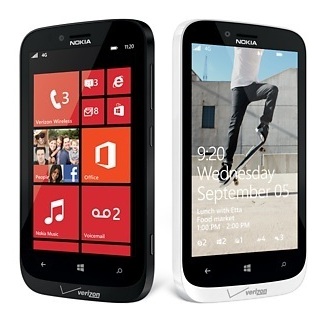
My thoughts on the Nokia Lumia 822 Windows Phone

I will admit. I was very reluctant to finally open the box that Verizon sent me so I could review the new Nokia Lumia 822 Windows phone. This phone is exclusive to Verizon and is one of the first two smartphones Verizon Wireless is carrying that runs the Windows Phone 8 operating system. I am now trying out the other phone HTC and will have a full update on that phone next week.

I am an Android geek but I finally gave in and took the test with the Windows Phone. We were invited by Verizon to head to a UNC Tarheel Basketball game to test out the phone. A couple days before, I decided to turn on the phone and get acquainted with the device. At first, it took some adjustment to figure out the app store. Once I was able to sign-in with an X-Box account, I was able to do a search for my most loved apps. Windows Phone 8 has 120,000 apps in its Window Store, and 46 of the top 50 are the most popular ones that we all are familiar with in our everyday use. The LiveApps function is a win for technology lovers. We all know apps drain our phone’s battery, but the LiveApps will provide you with live updates such as weather, sports scores and flight info without draining your battery. I used this feature at the game.

The camera with the windows phone is pretty impressive. It was actually taking better quality pictures at the game than my Samsung Galaxy S 111.

The camera is 8MP Auto Focus Rear–Facing camera with Carl Zeiss Tessar® Lens and Dual–LED Flash (3264 x 2448 for 4:3 mode; 3552 x 2000 for 16:9 mode). We were mid-way up in the stands and you can see what great quality. Click on the above picture to make it bigger.

The phone also has a 1.2MP Front facing camera: f/2.4; Still images (1280×960).

As you can see, great quality.

During the game, my youngest got a little restless but never fear. I had loaded up apps for her on the Windows Phone. I created her own area on the phone called Kid’s Corner. This corner allows you to share the apps and music with your child while password protecting your other content and safeguarding them against seeing things they do not need to see. I am really protective on what the girls can see and hear. This feature on the Windows Phone really gives a parent a peace of mind.

The tiles on the home page on the phone are full customizable. You can load what you want to access quickly and use frequently. I can understand why someone would want this phone if they have recently purchased a new Windows 8 PC or tablet as the appearance is so similar. It helps you stay connected on each device and always have your files at hand. The SkyDrive on the Windows 8 phones comes with 7GB of free online storage. This way you can automatically sync between your phone, your laptop, your computer and your tablet.

Overall, I can say I will not turn my nose up to the Windows Phone. It did take an adjustment period and for me to put the wall down between me and windows phone, but I am glad I did.

This phone is currently free on Verizon with a 2-year contract.

Disclosure: All thoughts and opinions are of my own. Verizon sent a test device in order to facilitate this review.

Verizon Wireless Big Announcement – Share Everything!

Verizon Wireless released big news today!

Today Verizon Wireless is unveiling their new Share Everything Plans for Smartphones, Tablets, Basic Phones, and more! Coming from a family that has five cell phones on our plan, two of those smartphones, a hot spot, we are beyond thrilled with this new Share Everything Verizon Cell Phone Plan.

Share Everything Plans represent a fundamental change in the way customers purchase their wireless plans. These new plans are replacing plans such as single line and family share with a new pricing structure designed around the number of devices on an account, not the number of people.

The new plans will include unlimited minutes, unlimited text, picture and video messages for all phones on the account (with exception of entry level basic phone only plan). You will be able to send as many messages as you want and never pay overage again. You will select the data you need and share it with up to ten devices on your account.

Awesome news, the Share Everything Plans include Mobile Hotspot so customers can connect all of their WiFi enabled devices to the Verizon Wireless 4G LTE network at no additional charge. This is HUGE!

Do you have a tablet? You will be able to add a mobile enabled Tablet to your account for an additional $10 per month with no long term contract and share their same data allowance within your plan.

For additional information about the new Share Everything plans, please visit http://verizonwireless.com/shareeverything.

Are you excited about the big news?

Related Posts with Thumbnails

Primary Sidebar

Hello! I'm Jen and my family is my world. My hope is One Moms World will give you ideas for family travel and/or give you great consumer product suggestions that will be useful for your family. Remember to spread joy today!

Follow Us!

Follow Us on FacebookFollow Us on InstagramFollow Us on TwitterFollow Us on PinterestFollow Us on YouTube

Search

Receive our updates in your inbox!

Enter your email address:

Delivered by FeedBurner

Footer